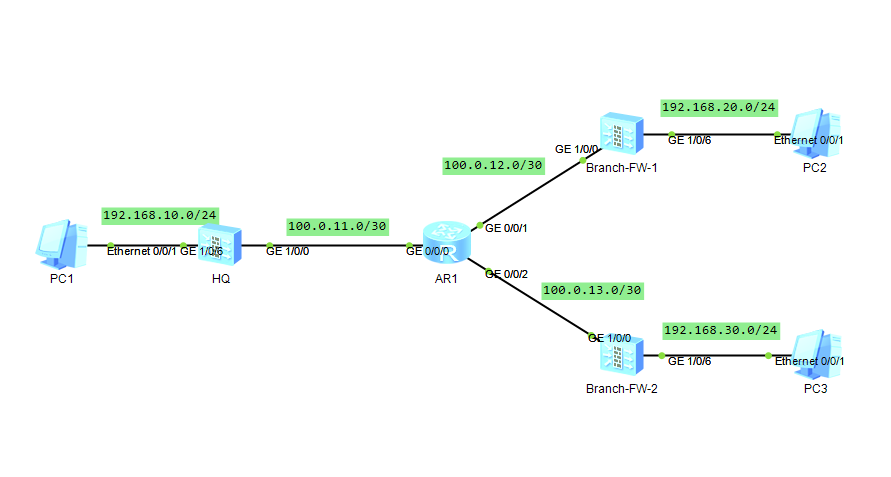
场景说明:HQ与Branch之间通过DSVPN建立OSPF邻居关系,并且通告自己的业务侧路由,达到总部与分支之间通讯的目的,由于是公网传送数据,因此采用IPSec对数据进行加密传输来提高网络的安全性。
HQ-FW配置:
#
sysname HQ-FW
#
ipsec proposal HQ //IPSec提议中采用ESP来加密数据校验数据,也可以采用AH-ESP完全保护IP头和加密数据
 esp authentication-algorithm sha2-256
 esp encryption-algorithm aes-256
#
ike proposal 1 //ike的提议采用的是默认配置
 encryption-algorithm aes-256
 dh group14
 authentication-algorithm sha2-256
 authentication-method pre-share
 integrity-algorithm hmac-sha2-256
 prf hmac-sha2-256
#
ike peer HQ
 pre-shared-key %^%#Of!_5@;wS9zFek.rtB=9._q=G,U16LGBZd7nEX]P%^%#
 ike-proposal 1
 dpd type periodic //DPD的检测模式为周期性检测
 dpd idle-time 60 //DPD的对等体存活空闲时间为60s
#
ipsec profile HQ
 ike-peer HQ
 proposal HQ
#
interface GigabitEthernet1/0/0
 undo shutdown
 ip address 100.0.11.2 255.255.255.252
 service-manage ping permit
#
interface GigabitEthernet1/0/6
 undo shutdown
 ip address 192.168.10.254 255.255.255.0
 service-manage ping permit
#
interface Tunnel0
 ip address 10.1.1.1 255.255.255.0
 tunnel-protocol gre p2mp
 source GigabitEthernet1/0/0
 ospf network-type p2mp
 nhrp redirect  //shortcut场景的DSVPN需要配置,因为需要总部节点转发分支之间的流量时,会向分支发送 nhrp redirect报文,触发NHRP地址解析,建立隧道与分支进行通信
 nhrp entry multicast dynamic //表示动态生成NHRP表项,总部配置后会将注册的分支加入到组播成员列表中,分支配置的话会将要注册的总部加入到自身的组播成员列表中
 ipsec profile HQ
#
firewall zone local
 set priority 100
#
firewall zone trust
 set priority 85
 add interface GigabitEthernet0/0/0
 add interface GigabitEthernet1/0/6
#
firewall zone untrust
 set priority 5
 add interface GigabitEthernet1/0/0
 add interface Tunnel0
#
firewall zone dmz
 set priority 50
#
ospf 1 router-id 10.1.1.1
 area 0.0.0.0
  network 10.1.1.0 0.0.0.255
  network 192.168.10.0 0.0.0.255
#
ip route-static 0.0.0.0 0.0.0.0 100.0.11.1
#
security-policy
 rule name Untrust_Local
  source-zone untrust
  destination-zone local
  source-address 10.1.1.0 mask 255.255.255.0
  source-address 100.0.12.2 mask 255.255.255.255
  source-address 100.0.13.2 mask 255.255.255.255
  destination-address 10.1.1.0 mask 255.255.255.0
  destination-address 100.0.11.0 mask 255.255.255.252
  action permit
 rule name Local_Untrust
  source-zone local
  destination-zone untrust
  source-address 10.1.1.0 mask 255.255.255.0
  source-address 100.0.11.2 mask 255.255.255.255
  destination-address 10.1.1.0 mask 255.255.255.0
  destination-address 100.0.12.2 mask 255.255.255.255
  destination-address 100.0.13.2 mask 255.255.255.255
  action permit
 rule name Trust_Untrust
  source-zone trust
  destination-zone untrust
  source-address 192.168.10.0 mask 255.255.255.0
  destination-address 192.168.20.0 mask 255.255.255.0
  destination-address 192.168.30.0 mask 255.255.255.0
  action permit
 rule name Untrust_Trust
  source-zone untrust
  destination-zone trust
  source-address 192.168.20.0 mask 255.255.255.0
  source-address 192.168.30.0 mask 255.255.255.0
  destination-address 192.168.10.0 mask 255.255.255.0
  action permit
#
return
Branch配置:
#
sysname Branch-FW-1
#
ipsec proposal Branch-1
 esp authentication-algorithm sha2-256
 esp encryption-algorithm aes-256
#
ike proposal 1
 encryption-algorithm aes-256
 dh group14
 authentication-algorithm sha2-256
 authentication-method pre-share
 integrity-algorithm hmac-sha2-256
 prf hmac-sha2-256
#
ike peer Branch-1
 pre-shared-key %^%#wx>#9|vk1Tm1JN=9gK|U='<K~,l!M1M:0%*OO,{7%^%#
 ike-proposal 1
 dpd type periodic
 dpd idle-time 60
#
ipsec profile Branch-1
 ike-peer Branch-1
 proposal Branch-1
#
interface GigabitEthernet1/0/0
 undo shutdown
 ip address 100.0.12.2 255.255.255.252
 service-manage ping permit
#
interface GigabitEthernet1/0/6
 undo shutdown
 ip address 192.168.20.254 255.255.255.0
 service-manage ping permit
#
interface Tunnel0
 ip address 10.1.1.2 255.255.255.0
 tunnel-protocol gre p2mp
 source GigabitEthernet1/0/0
 ospf network-type p2mp
 nhrp shortcut  //配置NHRP为shortcut模式配合总部节点nhrp redirect使用,可以减少设备CPU消耗,收到总部的nhrp redirect报文后向目的分支节点发送NHRP地址解析请求,建立隧道与分支进行通讯
 nhrp entry 10.1.1.1 100.0.11.2 register //配置静态的NHRP映射表并且向总部节点注册
 ipsec profile Branch-1
#
firewall zone local
 set priority 100
#
firewall zone trust
 set priority 85
 add interface GigabitEthernet0/0/0
 add interface GigabitEthernet1/0/6
#
firewall zone untrust
 set priority 5
 add interface GigabitEthernet1/0/0
 add interface Tunnel0
#
firewall zone dmz
 set priority 50
#
ospf 1
 area 0.0.0.0
  network 10.1.1.0 0.0.0.255
  network 192.168.20.0 0.0.0.255
#
ip route-static 0.0.0.0 0.0.0.0 100.0.12.1
#
security-policy
 rule name Untrust_Local
  source-zone untrust
  destination-zone local
  source-address 10.1.1.0 mask 255.255.255.0
  source-address 100.0.11.2 mask 255.255.255.255
  source-address 100.0.13.2 mask 255.255.255.255
  destination-address 10.1.1.0 mask 255.255.255.0
  destination-address 100.0.12.2 mask 255.255.255.255
  action permit
 rule name Local_Untrust
  source-zone local
  destination-zone untrust
  source-address 10.1.1.0 mask 255.255.255.0
  source-address 100.0.12.2 mask 255.255.255.255
  destination-address 10.1.1.0 mask 255.255.255.0
  destination-address 100.0.11.2 mask 255.255.255.255
  destination-address 100.0.13.2 mask 255.255.255.255
  action permit
 rule name Trust_Untrust
  source-zone trust
  destination-zone untrust
  source-address 192.168.20.0 mask 255.255.255.0
  destination-address 192.168.10.0 mask 255.255.255.0
  destination-address 192.168.30.0 mask 255.255.255.0
  action permit
 rule name Untrust_Trust
  source-zone untrust
  destination-zone trust
  source-address 192.168.10.0 mask 255.255.255.0
  source-address 192.168.30.0 mask 255.255.255.0
  destination-address 192.168.20.0 mask 255.255.255.0
  action permit
#
return
实验结果:
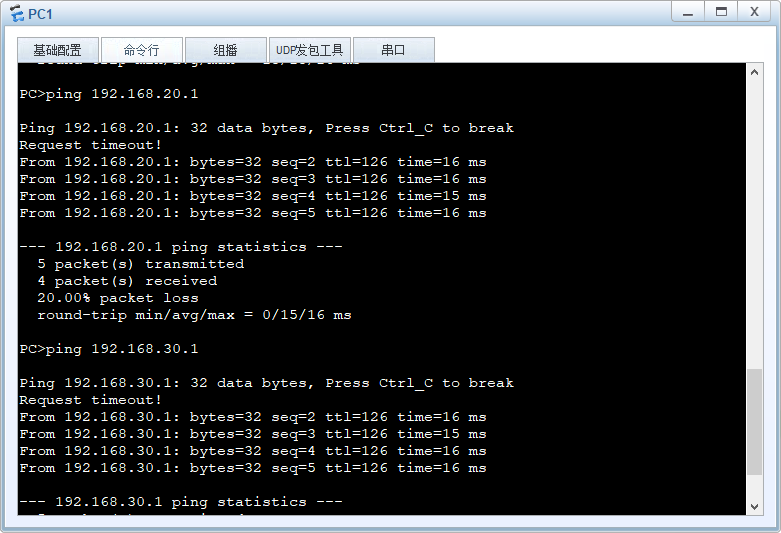
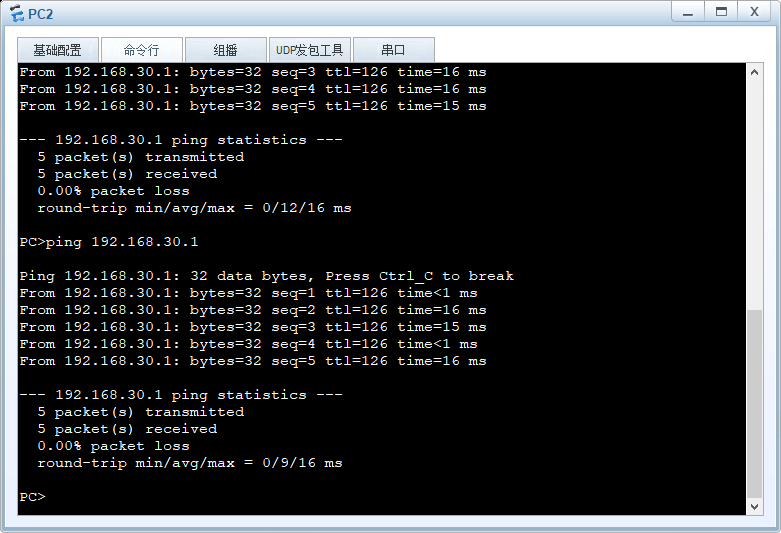
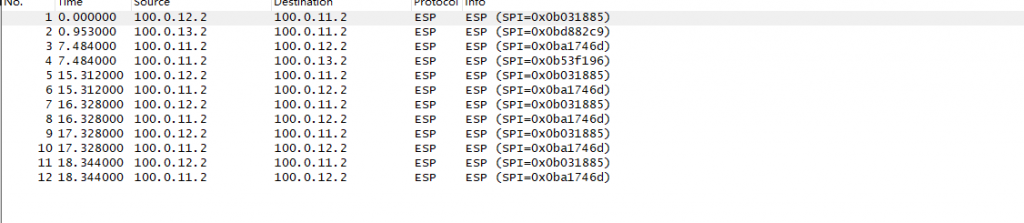
PC之间可以互相访问,并且抓包可见数据是经过ESP协议进行加密传输的